

Often websites are affected by malwares and other threats. It’s very important to protect our WordPress based site from such malwares. Many times, the webmaster uploads a file that is infected and thus infects the site also. That’s why the first precaution a user can take is to scan his/her own computer and ensure that the computer is free from malwares, viruses and such threats. In this article, we will be taking a look at some plugins that can scan your WordPress site for harmful threats and malwares.
Before moving forward, we don’t recommend that you install all these 4 plugins. If you want to scan your site then install them, scan your site and then disable or remove these plugins. These plugins will help you to identify potentially malicious code from your WordPress site.
Sucuri
Sucuri SiteCheck scanner will check your website for known malware, blacklisting status, website errors, and out-of-date software. This online scanner should be the starting point if you think that your website is affected by malware. There is no need to install any plugin, if you use this online scanner. You just need to enter your website’s URL and then hit the “Scan website” button.

Sucuri also offers a WordPress plugin named as Sucuri Sitecheck Malware Scanner. This plugin will check your site for malware, spam, blacklisting and other security issues like htaccess redirections, hidden code, etc. And yes, this is a free plugin.
Exploit Scanner
Exploit Scanner is another free WordPress plugin that searches for suspicious files on your website, posts and comments tables of database. This plugin will also check all of your active plugins for unusual filenames.
This plugin might sometimes return false positives and therefore you need to check if the file is really a threat or not. It won’t remove any anything from the site.
Theme Authenticity Checker (TAC)
Theme Authenticity Checker searches the source files of every installed theme for signs of malicious code. If any such malicious code is found, then this plugin displays the path to the theme file, the line number, and a small snippet of the suspect code.
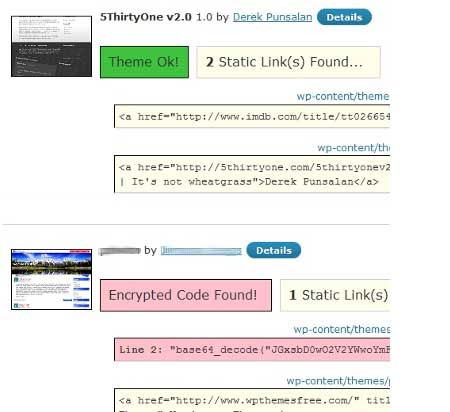
But note that just because the code is there doesn’t mean it is supposed to be a threat. Most authors don’t specify a code outside the scope of WordPress and if any theme specifies any such suspicious code, then it can be for some malicious purpose. You can then contact the author of the theme for clarification of the script.
AntiVirus
This plugin scans your theme files of your WordPress blog against exploits, malware and spam injections. If a virus is identified, then an alert is displayed in the admin bar. There’s also an option for enabling daily scan with email alerts.
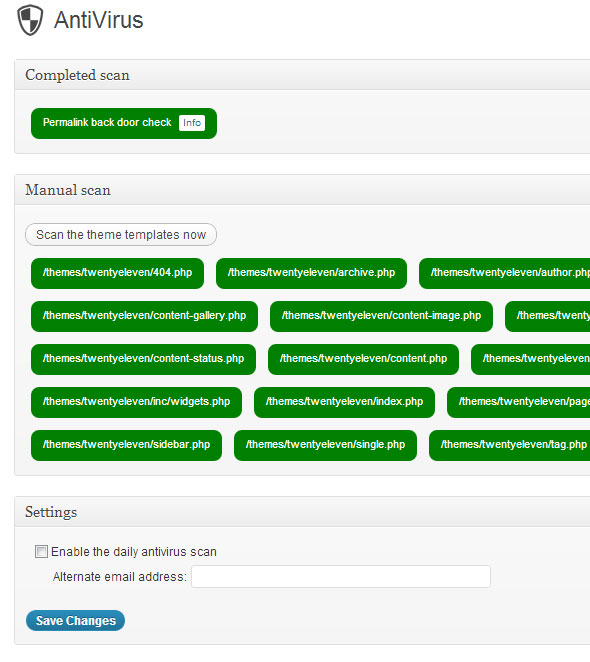
Once installed, you can click on “Scan the theme template now” button for a manual scan. It will scan each file of theme to check for threats. Check out AntiVirus plugin.
Go ahead, use these plugins to scan your website and stay away from malicious threats.