

It’s very important to protect your content from scrapers and those who steal your valuable content. One way that many websites steal content is by crawling your WordPress blog’s RSS Feeds and then publishing the article on their own website. You can find many such websites that benefit from your RSS feed. One question that can come to your mind is how can you prevent RSS feed from theft?
Well, you can’t exactly prevent RSS feed from theft, and there is no way to completely block all these crawlers. But there is one thing that as a webmaster, you should definitely do, and that is to add a hyperlink to every post of your blog’s RSS feed. Doing this will ultimately benefit your blog, as you will get a backlink to your original post/content.
Add Copyright Message and Link to RSS Footer
For this purpose, we will be using a plugin named as RSS Footer which is developed by Joost de Valk.
After installing this plugin, go to Settings > RSS Footer. From here, you can configure the text and the hyperlink. You can use the variables that will be replaced by the actual content. For example: %%POSTLINK%% will be replaced with hyperlink and title of the post as the anchor text.
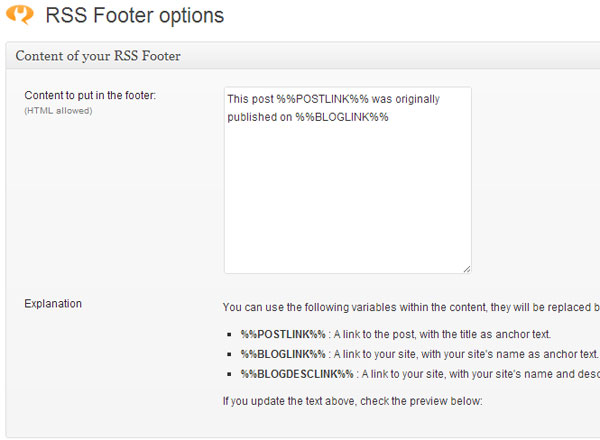
You can also see the preview of your RSS footer. Below the preview section, you can set the display position. In most cases, you should select “after” as the position.
One thing that you will notice about this plugin is that it was not updated in last two years. The developer of this plugin has stopped updating this plugin, because he advises to use his WordPress SEO plugin instead, which already has integrated this functionality.
Of course if you are also using this WordPress SEO by Yoast, then go to SEO > RSS and enter the content which you want to place in RSS Feed in the text field provided there.
Once you’ve configured the plugin properly, here’s how your RSS Feeds will look like in front-end.
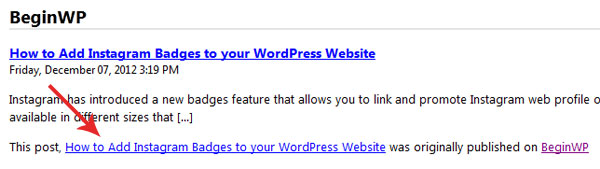
The advantages of using this plugin are:
- It improves your SEO as you will get a backlink to your content. This link will be a deep link with an optimized anchor text.
- Since you are real author of this post, you will get the benefit.
- Content stealers/scrapers won’t benefit from your content anymore, after installing this plugin.
- Add extra content to your feed to entice users to subscribe. You can also add some promotional offer or anything that you’d like to show to your RSS subscribers using this plugin.
If you are using Feedburner, then the feeds might not immediately show this change. In such a case, you can ping Feedburner manually. To do this, login to Feedburner, select your feed, go to Troubleshootize tab and click on “Resync” button. The changes should reflect immediately.
If you are blogger, then you should definitely use RSS Footer plugin, and if you already use WordPress SEO by Yoast, then just configure the options in its RSS setting page.