

With the evolution of the Internet, the growth of Social Media services like Facebook, Twitter, LinkedIn, Instagram to name a few, has been remarkable. These services have an enormous user base, and are the primary focal point among today’s generation. As we know that the purpose of a blog is to share our knowledge and opinions with the rest of the world, social platforms are considered to be the best place to gain some attention.
Now, the question that arises here is, how to automate this sharing process? How to automatically make a status update on Facebook, or tweet on Twitter, as soon as a new post is published on your WordPress site?
There are a number of ways you could do this. You could either use API of those services to integrate them with your blog, or you could install plugins. There are countless number of plugins available in the WordPress repository, which could help you setup automatic sharing with almost every social media platform present on the Internet. However, I recommend IFTTT service, which stands for “If This, Then That”.
What is IFTTT?
IFTTT is a service, which lets you easily connect one platform to the other. It uses the concept of Triggers and Actions i.e. If something is triggered, say, a new post is published on your blog, it performs the action linked to it, e.g. tweet about the post from your Twitter account. You could either create several Trigger >>> Action sequences (Recipes in IFTTT terminology) for each platform (Channels in IFTTT terminology), or you could use from the existing ones.
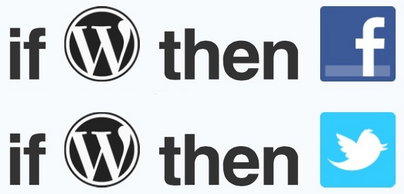
There are a lot of channels currently available to use on IFTTT, such as Facebook, Twitter, Instagram, YouTube, WordPress, RSS, Email, Blogger, Evernote, GMail, Google Drive, Dropbox, and many more.

These channels could either be used as Triggers or Actions, i.e. suppose if you want to post a link to your Facebook account, every time a new article is published on your blog, WordPress would be considered as the Trigger here, and Facebook as Action. But, of course you could use it the other way round as well i.e. suppose if you want to automatically publish everything you post on your Facebook account, to your WordPress site, you could always use Facebook as the Trigger, and WordPress as Action. It’s incredibly easy to setup Recipes anyway you like.
Connecting Social Platforms with IFTTT
To use the IFTTT service, you need to Join them first, for Free (A simple two-step registration process). Upon joining, IFTTT requires you to “Activate” all those Channels, which you’re going to use in your Recipes (including WordPress). Activation process is very simple, and requires only minimal details from your end.
IFTTT allows you to integrate your WordPress 3.0+ blog, either self-hosted or hosted on WordPress.com. To connect IFTTT service to your WordPress blog, you need to make sure that that the XML-RPC option is enabled. To activate it (if it isn’t already), go to Settings >> Writing from your WordPress back-end, and tick the XML-RPC option, under the Remote Publishing section.
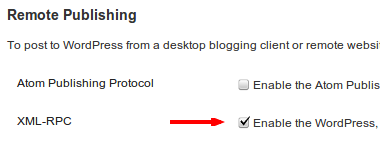
After enabling this option, and activating WordPress channel from your IFTTT account, you’re ready to connect WordPress with other channels, either as a Trigger, or as an Action. After activating all the channels which you’re going to use, setup your Recipes, and let IFTTT do what it does best, for you.
Final Thoughts
The best part I like about IFTTT service is that I don’t have to install any plugins on my WordPress blog, to share my posts on various social media platforms. Less plugins mean low page-loading time, and happy readers. Also, new channels are introduced from time to time. I’d suggest you to uninstall plugins you’re using on your blog for similar purpose, and give IFTTT a try.