

If you’re running a WordPress site that in some way stores cookies in visitor’s browser, then you’ll need to comply to the EU Cookie Law, also known as EU e-Privacy Directive. According to this law, websites must clearly state to visitors about what information is being stored. Even if cookies does not reveal any identifying information, you must still make it clear to visitors about what information you’re storing, and what for.
So if you want to comply with the cookie law, and if you’re using WordPress, then you can display a small banner on your site which allows you to seek explicit consent from users. For example, you can display a small banner for a certain time (like 10 seconds) saying:
Our website uses cookies to improve your experience. Please visit our privacy page for more information about cookies and how we use them. Your continued use of this website means that you comply with our policy.
Let’s learn how to display such a cookie information banner with your custom message to every visitor, for one time only. The banner won’t be displayed again to the same user.
Install and activate the WP Cookie Banner plugin. This plugin will help you provide simple ‘Implied Consent’ compliance with the EU Cookie Law. Once activated, go to Settings > WP Cookie Banner and then start configuring the plugin.

- Cookie duration: Select days after which the banner will be displayed again to the visitor.
- Banner display duration: Select time duration after which the banner will auto-hide.
- Privacy/cookies page: Select your privacy page from the drop-down. If you don’t have a privacy or cookie information page, then create one and then select that page from here.
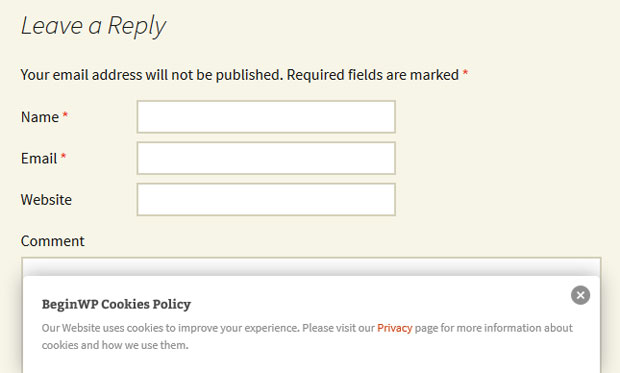
Once you’ve configured above settings, you can set your custom banner message that will be displayed to your visitor. If you want to customize the look of the banner using CSS, then you can do that too. Once you’re done, click on the “Save all cookie banner settings.” This is how the banner will look like in the frontend.
Conclusion
This plugin is not meant to block any cookies, but it simply shows a small banner displaying cookie information when the website loads for the first time. You can customize everything from the settings, which means it will work great for many of you out there, and that too, without touching any code. This plugin is a superb way to comply with legal laws pertaining to cookies.
Hope this small tutorial will help you to display a cookie banner in WordPress, in order to comply with legal laws of various countries. Check out more such useful tutorials from our WordPress plugins section.