

As pointed out every time, it is very much essential to ensure that you regularly update your plugins, themes and core WordPress to stay protected from old exploit holes, and also to get new features/offerings by the developer. But what if you don’t regularly login to your WordPress login to check for updates? Fortunately, there is a way using which you can know if a new version of a plugin is available, without logging in to WordPress Dashboard.
Imagine a scenario that you’re not logging-in to your WordPress Dashboard from a long time due to a personal reason. During this time, three of your active plugins were updated but you don’t know a bit about it as you’ve not logged-in to your WordPress Dashboard. WordPress does notifies you, but for that, you’ll have to check your wp-admin. Wouldn’t it be great if you can get email updates whenever a new version of a plugin is available? That’s exactly what we’ll be doing in this article.
Install and Activate the Mail On Update plugin. Once installed, go to Settings -> Mail On Update and from here you can configure this plugin.
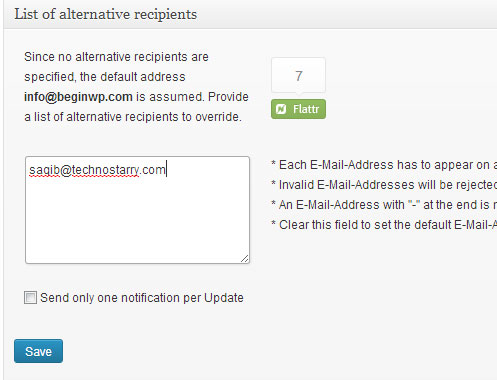
There’s a field for entering email addresses to which an email will be sent, whenever a new update of any installed plugin is available. If you don’t enter any email address, then email be sent to the default WordPress email address that you’ve set in Settings -> General.
If a new version of any installed plugin is available, then the admin (or any email that you’ve specified) will receive an email every 12 hours, informing which plugins needs to be updated.
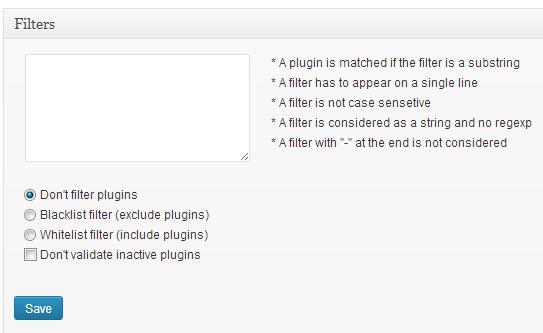
You can also filter out certain plugins if you don’t want to receive email alerts for those plugins. You can set a blacklist or whitelist filter. But in most cases, you should not use this filter option and the default settings should work great.
That’s it. Just install this plugin and have peace of mind to know that you’ll be getting email alerts whenever a new version of any installed plugin is available. No need to keep a check on “Updates” or plugins section of your wp-admin anymore. Now you can go on a holiday with peace of mind; just ensure that you check your emails regularly.
Awesome plugin, need to get this installed, would help keep our collection of WP sites up to date.