

A question that many people ask is how can they improve the performance and increase the loading speed of their WordPress website? As we know, that loading speed of a website is very important for visitors, as well as from SEO view. So after installing your new theme, it’s a good idea to see that the theme doesn’t loads any unnecessary elements. GTmetrix is one such plugin for WordPress that displays suggestions to improve the performance by analyzing your website or blog.
The plugin allows you to schedule reports based on daily, weekly, or monthly basis. You can see the status of your site from a widget that is displayed in the WordPress Dashboard (default landing page). Plus, it will also send you alerts if your site falls below a certain criteria.
Firstly, install GTmetrix for WordPress plugin and then activate it. Once activated, you have to add an API key which can be obtained from the website. Click on Register for a GTmetrix account now and then register and get the API key.
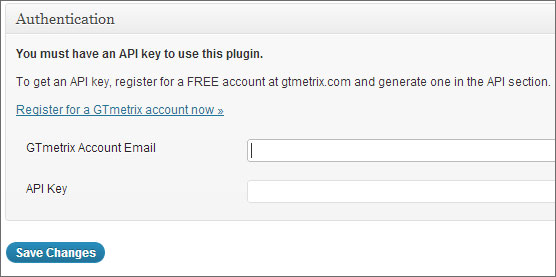
You will be able to see a new GTmetrix menu in your WordPress Dashboard. From this menu, click on Tests. Now, click on Test your Front Page now button to start analyzing the front page of your website. If you want to test a particular URL on your website, then you can enter the URL and click on Test URL now.

The results are displayed right in this page from the Reports section. You can click on a report to see more details. Now, this is where the plugin helps you to your WordPress site performance. For example, take a look at the below report:

The first thing that you will observe is the Page Speed Grade and YSlow Grade. In the above example, the Google Page Speed score is 93% and YSlow score is 83%. The scores of YSlow are low, may be that’s because it cannot detect the CDN. Now, check out the Page Speed, YSlow and Timeline tab which offers detailed statistics related to your website. You may want to improve on these suggestions.
For example, you can see that the first suggestion that is offered is to optimize images. Click on it and then you can see which exact images needs to be optimized and how much size can be reduced. You can also directly get the optimized version of the image from here. Next, you can see that it displays a suggestion to remove unused CSS. Click on it and then you can see which CSS can be removed from your website. Likewise, take a look at all the suggestions displayed where you can improve on.
There’s also a What does this mean icon if you don’t understand what’s the importance of the current option. This will tell you the meaning and importance of the selected item.
If you don’t want to install any plugin for this purpose, then you can try out their web based version by going to the GTmetrix website. There’s also a GTmetrix bookmarklet that you can add to your Chrome, Firefox, Safari, or Internet Explorer browsers.
If you want to analyze your WordPress site and optimize it for faster loading, then this plugin should definitely help you.
Have you tried out GTmetrix? Let us know your thoughts in the comments.