

Widgets in WordPress are so easy to use that even beginners don’t fear to use it, and it can be used multiple times of course. For example, you might have a text widget, a recent posts widget and many others in your widgetized area. Most widgets have a title field which you can use to show a title in the frontend, and it’s also visible in the backend too. But sometimes you might don’t want to display the widget title on your website. So the question that comes to the mind is how to hide widget title in WordPress? We’re going to show you exactly that in this tutorial.
Some of you might think that if we don’t want to show title in the frontend then we simply need not to enter it in the “Title” field of the widget. But this trick works only on some widgets. If we take an example of the default Twenty Thirteen theme, and in that theme if you have not entered any text in the title field of Recent Posts and Recent Comments, then by default, it will still display Recent posts and Recent comments as titles in the frontend. That’s why, let’s learn how to remove widget titles.
Hide/Remove Widget Title in WordPress
Install and activate Remove Widget Titles plugin from here. Once activated, you don’t need to configure any settings. Visit Appearance > Widgets and then add an exclamation mark before the widget’s title that you want to hide.
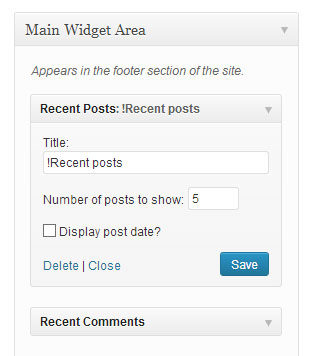
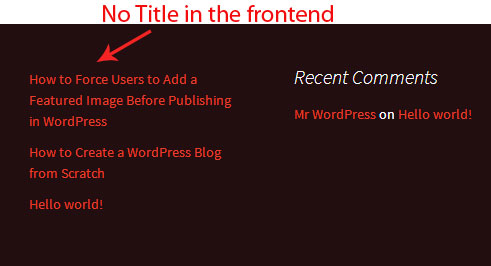
As you can see in the above screenshot, I don’t want to display the title for Recent posts widget and that’s why, I have added an exclamation mark followed by the widget’s name. This is how it will look like in the frontend.
There is one more situation when this plugin can become useful. Let’s say you have many widgets added to your site, and in such a case, it becomes difficult to know which widget is for which purpose. Simply add the exclamation mark “!” (without quotes) before the title’s name and then use a relevant name. For example, if the text widget is displaying an advertisement, then write “!Advertisement.”
So that’s how you can hide titles from widgets in WordPress. Check out more such useful tutorials from our WordPress plugins section. If you know a better way to do this, then let us know in the comments.