

You must have observed news tickers on various news channels which displays latest breaking news, trends, stock market prices, etc. Since they keep on scrolling, they have the potential to display lots of information, and that too without taking up much space. You too can insert a news ticker in WordPress to display your latest posts, special deals, hot topics or anything else that you have in your mind. So let’s learn how to insert a custom scrollable news ticker to WordPress.
Install and activate Ditty News Ticker plugin. Once activated, you’ll be able to see a new menu for News Ticker in your WordPress admin. From this menu, click on the Add New link to add a new ticker to your site.
On the next screen, you can enter a title for your news ticker, enter ticker text and link. You can add multiple ticker items by clicking on the + button, to add it as the next item on the ticker. Scroll down and you can choose a ticker mode from three options – scroll, rotate or list.
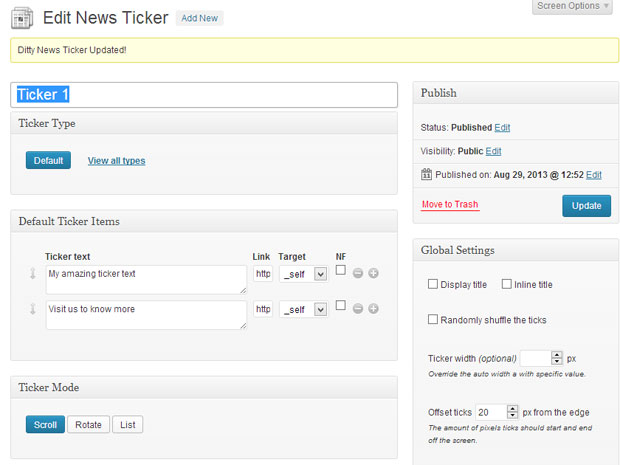
- Scroll Mode – Scroll the ticker data left, right, up or down.
- Rotate Mode – Rotate through the ticker data.
- List Mode – Display your ticker data in a list.
The scroll mode is the default one, as it is used most commonly in television and on various websites. If you want to show one ticker text at a time then rotate mode is a good option. Whatever option you choose, don’t forget to adjust the behavior of the news ticker from “Scroll settings.” From here, you can configure scroll direction, speed, text dimension and spacing between each ticker text. Also it is a good idea to check mark “Pause on mouse over” so that if a user hover’s the mouse on a text, then the ticker is paused.
The above instructions were related to the creation of the ticker. Now, to add the ticker to your WordPress site, you have two options – you can either get the shortcode and add it to your post or page, or you can get the PHP function and add it directly to your theme’s file.

Once you do this, you’ll be able to see the ticker on your site. This surely is a good choice to make an important announcement, or may be you simply want to list your latest post to your visitors. So go ahead and use this method to add a news ticker to your WordPress site. Should you have any queries, feel free to post it in the comment section below.