

Community forums are a great place for discussion and many people love sharing their knowledge on the topic. When your WordPress blog gets popular, apart from comments, people may demand for a forum. That’s why, let’s learn how to embed a forum in WordPress – the most easiest possible way ever.
How to Make a Forum in WordPress
For this purpose, we will be using a WordPress forum plugin named as bbPress. There are many such free plugins for WordPress users, but bbPress is the best and easiest solution to create a forum in WordPress site. What’s more, bbPress is developed by Automattic, the same company that develops and maintains WordPress and therefore it beautifully integrates with WordPress blog.
According to the developers, bbPress is plain and simple forum software. It is very easy to administer, fast and clean. The backend of bbPress will resemble a lot like WordPress admin area which means in most cases, you won’t feel lost.
Just like WordPress, bbPress also supports installation of a number of different plugins and themes. There are many bbPress plugins and themes which the user can choose as per his needs. This plugin is developed and designed to integrate perfectly with WordPress and the focus is on simplicity.
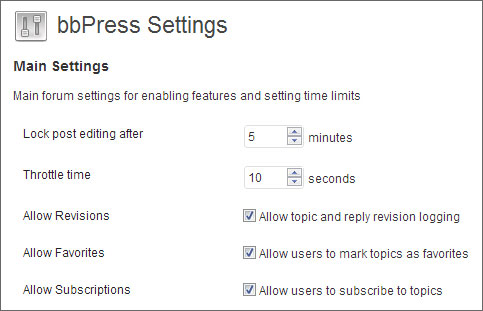
Install bbPress plugin and then the first thing that you can do is to configure the forum to suit your needs. To configure bbPress, go to Settings > Forums.
From here, you can configure mostly every aspect of the forum. Here’s a screenshot of settings from this page.
There’s a dedicated section in the same page that allows you to configure slugs (permalinks) such as forum slug, topic slug, topic tag slug, reply slug, user slug and topic view slug.
You can also configure to allow subscriptions, allow anonymous posting, enable fancy editor, change bbPress template, how many topics and replies to show per page and per RSS page and many more such options are present.
Once you have configured bbPress forum settings, it’s time to start adding new forums, new topics and new replies. You will see a new section in your WordPress admin such as Forum, Topics and Replies. Click on the respective option to start adding posts/forum topics. Also you can check out the front-end to view how your forum looks.

If you are using WordPress and are thinking to add forum to your site, then there is no reason why you should not try out this bbPress plugin. Using this plugin to add a forum to WordPress is a piece of cake, it’s simple, easy and doesn’t require you to configure any MySQL or any other settings.