

Sometimes when publishing a post on WordPress, we might forget to add a featured image, and in fact, the same thing has happened with me many times. Some themes out there automatically take the first uploaded image as the featured image, but not every theme out there works this way. That’s why, there’s a handy plugin for this purpose – Require Featured Image, as the name suggests, it restricts every user (including you) from publishing a post until a featured image is set.
This plugin is also a perfect choice for those who use a WordPress theme which is heavily dependent on featured image – if there’s no such featured image then it may break the site’s layout. Even if you don’t forget to set a featured image, your clients or authors (if you run a multi-author site) might omit a featured image. That’s where this plugin will help you. It basically forces users to set a featured image, without which, the user won’t be able to publish the post. The Publish button will remain inactive until a featured image is selected.
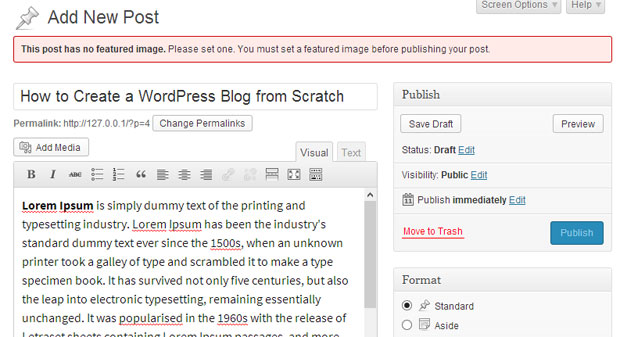
In the above screenshot, we can see that the publish button is not clickable and a warning message is displayed that says “This post has no featured image. Please set one. You must set a featured image before publishing your post.”
Once you set a featured image, the Publish button will become clickable. This is a set it and forget it plugin, and it doesn’t comes with any settings page. Simply install it on yours or your client’s site and they won’t ever forget to add a featured image to WordPress. Yes, no more hassles and reminding anyone that you forgot to add a featured image.
Note that the Require Featured Image plugin only works with posts, and it won’t work with pages or any custom post type. Let’s just hope that the plugin developer might add support for it in the future versions. For now, we’ll have to live with this limitation though.
So go ahead and give this plugin a shot. Check out more such useful tutorials from our WordPress plugins section.