

One of the most important feature of a blog is the ability to post comments or discuss about the topic. WordPress has a wonderful in-built commenting system, which is very flexible and easy to implement. However, it is not very effective against SPAM on it’s own. The spam comments are usually filled with junk and irrelevant information, along with a link-back to it’s source, which may possibly be infected with malware. If not blocked, they bloat your blog’s comment section making it unreadable for others, thus, destroying the overall user-experience.
Now, the question that arises here is: How to get rid of SPAM comments, and prevent them from coming back?
To answer the above question, we’ll go through a 3-step procedure.
Identify
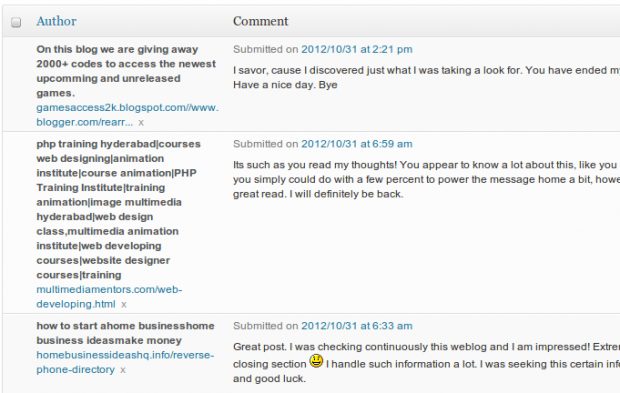
The first step is to identify what comments are clean, and what are spam. To manually identify comments, go to the Comments section from the back-end, and look for comments with common keywords under the “Author” field, instead of a proper name. In most cases, the comment text would also be random and irrelevant with respect to the context of the article, it is posted on.
Remove
After identifying the comment as spam, you may either move that comment to “Spam” or “Trash” section, by clicking the Spam or Trash link just below it. You may also select comments in bulk, and move them to those section in one go. After moving the comments to either Spam or Trash section, you may delete those comments permanently from your blog.
Prevent
So far, we’ve discussed about identifying and removing spam comments which were already present on your blog. Now, we need to make sure that such comments don’t appear on your blog again, and to prevent them, we would take two small steps.
- Setting up Akismet – Akismet is a spam prevention plugin, developed by Automattic, which comes pre-installed in WordPress. It automatically filter comments by comparing all the related attributes with a database of spam sources present on it’s server. It does not guarantee 100% spam prevention, but it’s very effective at what it does.
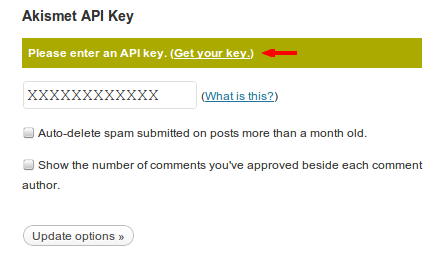
You can activate the plugin by navigating to Plugins >> Installed Plugins page, and clicking on the “Activate” link, situated just below the plugin name. After activating it, go to Plugins >> Akismet Configuration,and click on “Get your key” link to obtain a unique FREE API key from their website. Enter your unique API key, and hit the “Update Options” button. Akismet is now ready to fight and keep spam away.
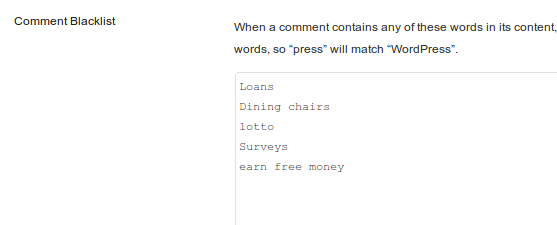
- Blacklisting keywords – Another layer of prevention would be to blacklist those keywords or phrases, which frequently occur in your spam comments. WordPress has an in-built feature, which allows us to do the same. To set this up, go to Settings >> Discussion, and inside the “Comment Blacklist” area, you can provide all the keywords or phrases that needs to be blacklisted. After saving the changes, any comment containing those keywords or phrases, listed in the blacklist section, would be sent straight to Spam folder in the Comments section. This will help you in blocking recurring spam comments.
And that’s it. Your blog is now spam-free. As always, you could leave your comments below in case you have any doubts or tips you’d like to share regarding spam prevention. Send anything but SPAM.