

Sometimes, the default WordPress Comments system is just not enough for all our needs, especially knowing the fact that we could do a lot more than just posting comments. It’s too basic, and can’t be customized beyond a point. So, the only remaining option is to look for an alternative. There are many actually, such as Facebook Comments system, Livefyre, Disqus, IntenseDebate, etc. We talked about integrating Facebook Comments earlier, which is in a way, limited to just Facebook users only.
 In this article, we’re going to talk about Livefyre, another good alternative to default comments system provided by WordPress. Now, you might be wondering what’s so special about Livefyre? Below are the major benefits you’ll get, upon installing Livefyre on your WordPress blog.
Real-time Comments – The comments made through Livefyre appears instantly, thus, increasing the chances of engaging in conversation with others. It almost feels like a chat system. It also allows you to receive email notifications for comments posted on articles you follow.
Social Sync – One of the best features of Livefyre is Social Sync i.e. it capture comments made on Twitter, Facebook etc. related to your article, and displays it in your article’s comment stream.
Social Sign-in and Tagging – To post a comment using Livefyre, it’s required to be signed in (unless blog admin allow guest posting). Apart from using your Livefyre.com account, it also allows you to sign-in to Livefyre using your Social accounts such as Twitter, Facebook, Google+, and LinkedIn account. Once signed in, you could also bring your friends into conversation, by tagging them in the comment box.
Powerful Admin-panel – Admin-panel on Livefyre.com is very powerful, and allows you to moderate comments, edit comments, assign blog moderators, blacklist users, manage profanity lists, activate/deactivate various Livefyre features, and a lot more.
Lightweight – Livefyre plugin uses minimal resources to load on your blog, hence, keeping your site’s performance optimal.
Excellent Support – The support provided for Livefyre is excellent. The support team is experienced, quick to respond, and ready to jump into details to help you solve your Livefyre-related issues.
You may visit the official site to learn more about Livefyre Comments.
So, to integrate Livefyre with WordPress, you need to install the Livefyre WordPress plugin, and connect it with your Livefyre.com account. That’s it! No more configurations required. Livefyre handles everything, from importing existing comments, to replacing your old WordPress Comments system with it’s own. Here’s how you could do it, in a bit more detail.
Step 1: Install the Plugin
The first step is to install and activate the Livefyre Realtime Comments plugin for WordPress.
Step 2: Connect with Livefyre.com

A new “Livefyre” option would appear under the Comments tab. Navigate to that page (i.e. Comments >> Livefyre). A message (with a link) would appear on top of the page, asking you to connect your blog with your Livefyre.com account.

Now, click on that link. It will take you to Livefyre.com, where you have to sign-in (or free register a new account) to connect your blog with it.
Step 3: Finalize
After you’ve successfully connected your WordPress blog, with your Livefyre.com account. It’ll automatically start importing all the existing comments from your site’s database, to its own.
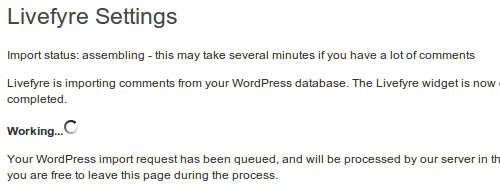
Importing process might take a few minutes, depending upon the number of comments already posted on your blog. After it’s finished, you can visit the blog’s front-end, and you’ll find the Livefyre Comments box already in place, instead of the default WordPress Comments box.

Final Thoughts
Livefyre Comments is an ever-growing product, which is rapidly gaining popularity among bloggers. The development team is very active, and introduces new features from time-to-time. It’s a wonderful solution to try on your blog, if you’re looking for an alternative to default comments system.