

When it comes to adding multiple functionality to WordPress, Jetpack is one of the best plugin for this purpose. Currently it is the most popular plugin at WordPress plugins library. Developed by Automattic, the company behind WordPress, they have given the Jetpack plugin a big update. Let’s take a closer look at some of the new features of the Jetpack 2.0.
In a nutshell, Jetpack 2.0 comes with lots of new functionality. For example, you can connect your blog to Facebook, Twitter, LinkedIn and Tumblr. It also allows you to Post by Email, add infinite scroll to your blog and allows you to take advantage of the advanced image acceleration and image editing service from WordPress.com (which is known as Photon). Let’s take a look at all these features in detail.
Publicize/Connect your Blog to Twitter, Facebook, LinkedIn & Tumblr
This is one of the most important update that has arrived to Jetpack. With Publicize, users can connect and configure their blogs to automatically share posts on social networks like Twitter, LinkedIn, Facebook, Yahoo and Tumblr. There are many plugins that allows you do to this, but in the case of Jetpack, this plugin has an edge over other plugins because the setup is very simple and straightforward. It took approximately one minute to connect my blog to Facebook.
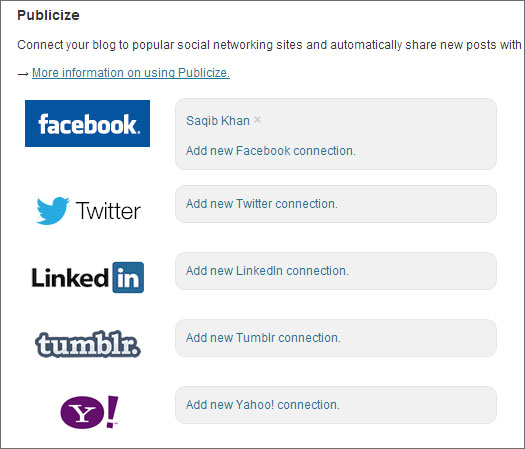
The process of connecting your blog to social networks is very easy. To take advantage of this feature, Activate Publicize from the main Jetpack page in your WordPress Dashboard, then go to Settings > Sharing to add social sharing connections.
Post by Email
WordPress already has a post by email functionality for many years but the process to achieve this is complex. The Jetpack plugin now allows you to Post by Email the same way as it exists on WordPress.com sites. You just need to send an email to your secret email address and the formatting will be taken care of.

To enable this feature, go to Users > Your Profile and then click on the “Enable Post By Email” button. You will then get an email address, where you can send your email to.
Photon – Using Advanced Image Acceleration service from WordPress.com

Photon is a service that handles the image resizing and caching on WordPress.com’s servers. But now this service can also be used by self-hosted WordPress blogs. Jetpack Photon uses advanced image acceleration and image editing service and makes every image a fully dynamic object that themes and plugins can use. After enabling this feature, you can see that the CPU and bandwidth usage will go down as your images will be served through the global WordPress.com cloud, which means less load on your server and faster loading of images.
To activate Photon, go to the Jetpack page and Activate Photon. There’s no other setting that you need to perform.
Infinite Scroll

Infinite Scroll loads new content quickly without a full-page refresh, which means less user interaction. This also means that user can most likely read more content, rather than clicking on next page and waiting for the page to refresh.
The normal methods of pagination are the “Newer” and “Older” posts button and the numbered method where 1,2,3,4 page numbers are displayed. But these methods look like traditional methods and if you would like to add infinite scrolling to your WordPress blog, then you can Activate this feature from Jetpack.
Your theme should support this feature, and if doesn’t, then there is documentation available using which you can delve in coding and make your theme compatible with infinite scroll.
So that’s it. Use these new features of Jetpack plugin and supercharge your WordPress blog. Let us know which features of Jetpack 2.0 do you like the most.