

WordPress, by default, comes with a very simple registration system. To register on WordPress, a user simply needs to submit a user name and email address. A password is then emailed to the user, using which he can login to WordPress. While this works for many, there’s an alternative and easy way to sign-up and then log-in to WordPress using various social media services Facebook, Twitter, LinkedIn, Google+ and more.
Instead of the traditional method of registering, you can add additional social media registration functionality to your website so that a visitor can quickly login using the social media service of his choice. The good thing about this is that adding this functionality is really easy, quick and doesn’t involves you to delve in coding.
Log In To WordPress Using Social Networks
This functionality can be added to the website by using a plugin. There are many plugins that will help you achieve this in WordPress website but here are two selected plugins that are tried and tested. Both the plugins are free to download and you can choose any one of them that suits you the best. Before proceeding forward, if you are going to try out the plugin on a live website, then it’s a good idea to backup your database, just in case something goes wrong.
WordPress Social Login
With the WordPress Social Login plugin, users can login and comment using with over a dozen of different social media services. This plugin supports Facebook, Google, Yahoo, Twitter, Windows Live, MySpace, Foursquare, LinkedIn, Tumblr, Gowalla, Last.fm, Instagram, Goodreads, AOL and many others.
After installing the plugin, you will need to configure each service by adding corresponding application ID and secret key which can be obtained from the respective service’s site and the instructions are mentioned in the same page. Each service can be configured from “Providers setup” tab. Once the details are entered, you need to select “Yes” from the dropdown menu to allow users to login with the service.
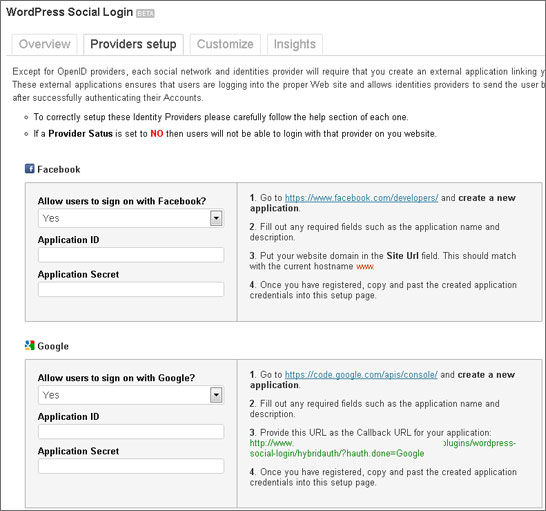
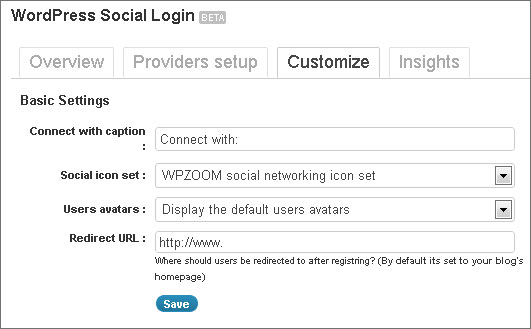
The “Customize” tab allows you to configure basic settings, for example, you can enter the text that you want to be displayed before the social media icons. From the Social icon set dropdown menu, you can select one between two icon sets that suits you best. You can also enter a redirect URL so that once the user registers, they will be redirected to that page.
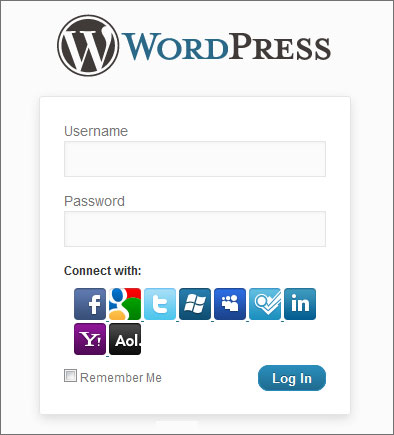
When you have configured everything, you can check out the login page. Now your visitors can register and login using these social media buttons. These buttons are also added at the top of your comment form so that people can directly sign-in from there and leave comments.
The plus point of this plugin is that it supports many different social media services. If you want to add these login buttons to some exact place in your design, then you can do this with the help of PHP code which is explained in the documentation. Overall it can be said that this is a very good plugin that lets you easily and quickly add social login to your WordPress site.
Download WordPress Social Login Plugin
Social Login
This is yet another social media login plugin. This plugin is also compatible with BuddyPress and supports English as well as German language.
This Social Media plugin can help your visitors to comment, login and register with social networks like Facebook, Twitter, Google, LinkedIn, Paypal, Yahoo, LiveJournal, Foursquare, OpenID, LiveJournal, Windows Live, Blogger, Disqus and many more.
Firstly, you will need to sign-in using OneAll or other social networks to configure this plugin on your website. Next, you will need to enter details regarding your website, such as URL and website name. Make sure you enter these details correctly.
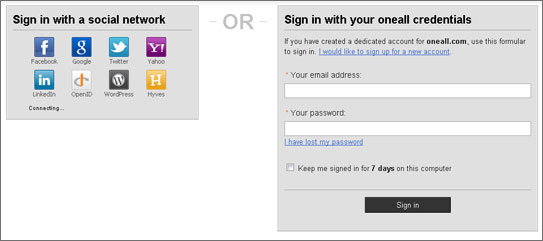
Once you finish above step, you will also need to configure each service separately. You will need to set up an application on the service and then enter those details in this plugin.

When you are finished with configuring this plugin, you can then see the Faebook, Twitter, Google, etc login details in the WordPress login page. These buttons are also added to the comments page and if that’s not all, there’s also a widget that can be added to the sidebar or any other area to show social login buttons.

It supports lots of popular social networks and is available in other languages also. If you don’t mind the long configuration part of this plugin, then this is a cool plugin to try out.
So that’s how you can add social network login functionality to your website. Once you configure the plugin, you add some more convenient ways for your visitor to login to your website. Go, make your WordPress site social and increase interaction.
Pretty! This has been an extremely wonderful article.
Thank you for providing this info.
You have missed other popular social login plugins like
http://wordpress.org/extend/plugins/loginradius-for-wordpress/
http://wordpress.org/extend/plugins/rpx/
These plugins also enable social sharing and commenting too for wordpress.