

Bloggers already know the importance of keeping visitors on site which helps in decreasing the bounce rate. To keep users on site, a solution would be to show them related content that interests them. We already know how Amazon shows related products which interests a potential buyer. The same formula can be applied by a blogger to show related content to keep visitors engaged on the site.
YARRP (Yet Another Related Posts Plugin) is one such plugin that works really well for many bloggers but let’s take a closer look at one such alternative to YARRP known as nRelate Related Content Plugin.
Note: This plugin has been discontinued by the developers. Instead, check out the best related post plugin with thumbnail for WordPress.
Installing nRelate Plugin
To install this plugin, go to Plugins > Add New and search for nRelate. The first result nRelate Related Content is the plugin that you should install. Other plugins add more functionality to this core plugin but not required if you’re just starting out. Or if you prefer to download and install it manually, then download it from here.
Note: nRelate can take some time to start displaying related posts, as your site first needs to be indexed. This process can take 1 or 2 hours, depending on total posts you have.
Configuring nRelate
Now that the plugin is installed, its time to configure nRelate. To do this, go to nRelate > Dashboard. From here, you can exclude certain category to not display any related posts from that category. Let’s say you have a category named as “Blogging” but do not want to show any related posts from this category, then just select this category from here.
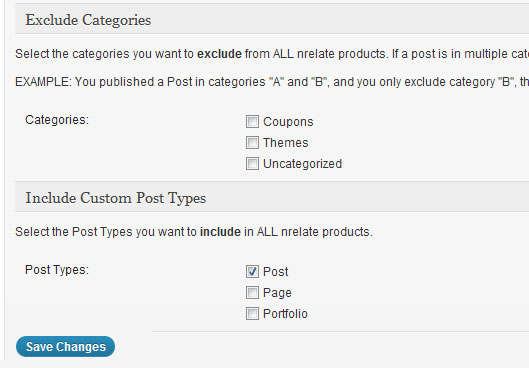
You can also select the custom post types to display related content. If you only want to display related content from Posts, then just select Post. After configuring, click on Save Changes to save these changes.
Now, navigate to nRelate > Related Content. From here you can start configuring various advanced settings for this plugin.
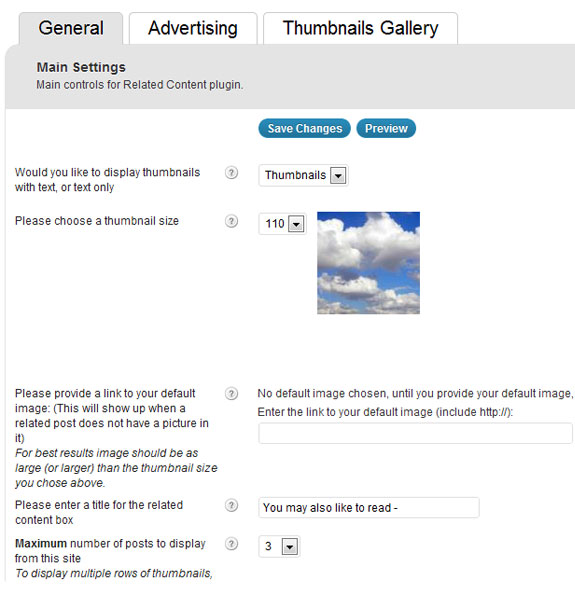
From the General tab, you can set nRelate to display related posts as texts or thumbnails, choose a thumbnail size, set a default image, title for related content box, maximum number of posts to display, etc. This plugin can be easily configured by any one and the options provided are really simple to understand.
From the Layout Settings section, you can select where you want nRelate to display related content. In most cases, you would like to display related content only in Single Posts (is_single). You can also change the position of related content – top of post or bottom of post.
Earning with nRelate
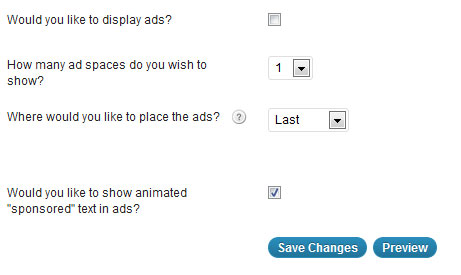
nRelate can display content ads within the plugin. You can start earning money by displaying related content from advertisers. You can configure how this works from the Advertising tab. Firstly, you’ll need to join the partners program to start displaying ads and then configure various options like how many advt. space to display, where to place the ads, show “sponsored” text in ads, etc.
Thumbnails Gallery
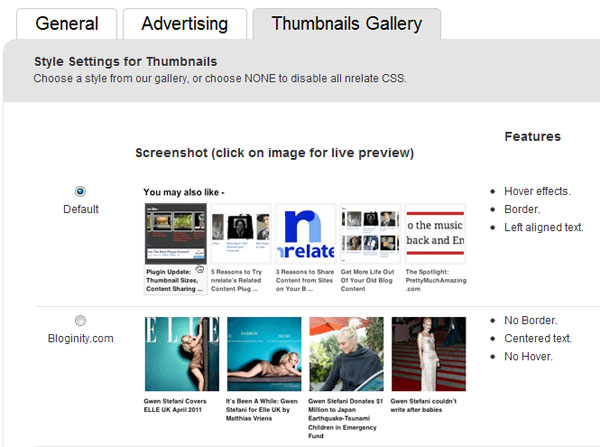
From “Thumbnails Gallery”, you can select a style that applies to your related posts. You can choose from 8 templates or you can also create your own CSS. Of course to create your own style, you’ll need to be well versed with CSS.
If you are wondering how does nRelate compares to YARPP, then here are some points that sets nRelate apart from others:
- YARPP is entirely self hosted which means that all the related posts and processing is done by accessing your database. For a large site, this can create problems and can also slow down the site.
- Customizing YARPP is a tedious task as it involves creating a custom template, whereas nRelate has many in-built templates ready to be used.
- nRelate offers program to earn by displaying related content from other sites, whereas YARPP doesn’t have any such feature.
- nRelate offers many other plugins that adds more features to the core plugin, such as nRelate Flyout and nRelate Most Popular.
- Customizing nRelate with the help of options available is very easy. YARPP doesn’t offers many such options.
If you are thinking to reduce bounce rate and engage your site visitors, then try out this solution. This related content plugin displays related posts with thumbnails, that will most likely attract visitors to display content that interests them.