

WordPress can be used not just for single author blog, but also for a blog with multiple numbers of authors. Each user created will get his/her own permission, which the admin can set when creating the user account. For example, some users have ‘Author’ role who can only add and edit their own posts, while some are given ‘Editor’ role who can add and edit anyone’s posts. Likewise, WordPress offers a total of 5 user roles.
Now let’s say you’ve got a multi-author blog, but now one of the employee has quit working. What would you do in such a case? Deleting that user’s account is not a solution as it will also delete all those posts, or you can assign those posts to some other user. For those who don’t like any of these solutions, here’s what you can do to prevent the user from logging-in to WordPress.
Change the email and password details of the user
You can change the user role to “subscriber” but the user will still be able to login to WordPress. The user won’t be able to change any theme or plugin settings, add or edit posts, but it doesn’t stop the user from changing display name. A user with a bad intention can harm your site by changing the display name. That’s why, you might want to change the user’s password and email.
But why would you change both? Because if you only change the password, then the user can simply use the lost password feature and recover the password. That’s why, you’ll need to change both – email address of that user and also the password so that the user cannot get the password recover email in their Inbox.
Using Disable Users plugin
For those who think that using the above method is too much of a hassle, and want an easier way to block or disable a user in WordPress, they can try using the Disable Users plugin from here.
This plugin is very simple to use. Once installed and activated, you’ll be able to see a checkbox on the user profile settings page, which can be reached from: Users > All Users and clicking on the user for which you want to disable the account. Here’s how this option will look like:
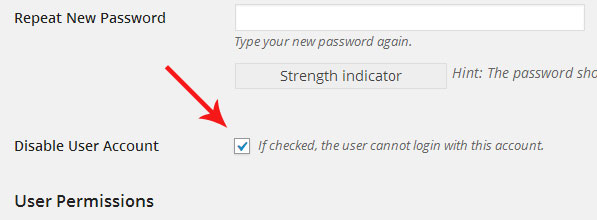
Simply checkmark this “Disable user account” setting from the profile page of that user. Once you’ve done this, the user won’t be able to login, and will get a message that states “Account disabled.”

This plugin is a quick and easy way to ban, or disable a user from logging-in to WordPress.