

If you’re a blogger or manage a large site, then you must be keeping a list of post ideas that you would like to work on. Some ways to do this is to keep a to-do list, use some mobile apps like Evernote, use MS Word, Google Docs or some other program. While there’s no problem with these ways, there’s one more way and that is to simply draft the post idea. This can be done by clicking on “Save Draft” button, but the problem with this method is that the drafts are included with your published posts and sometimes it could look like a mess.
Of course all these methods to keep record of article ideas work great, but here’s a WordPress plugin called Ideas that you should definitely look at.
The Ideas plugin is an extremely simple way to manage ideas in your WordPress admin. It lets you keep a track of all your future article/post ideas with description, links and more. Let’s take a closer look at this plugin.
Installing and Activating Ideas Plugin
To install this plugin, go to WordPress admin > Plugins > Add New. Search for “Ideas” and install this plugin. Once installed, you can activate this plugin from Plugins section.
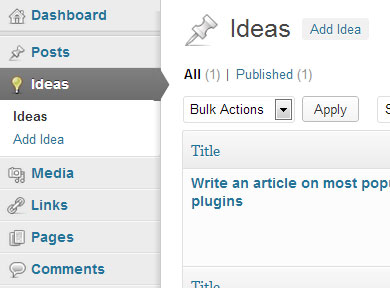
Once activated, you will notice a new section for Ideas. This is where we can get started to use this plugin.
Adding Post Ideas to WordPress
Click on “Add Idea” to add a new idea. You can now enter a title of idea, description and links that you want to refer to when actually working on that idea. There’s no option to upload images, but then we won’t miss this feature as the plugin is simply focused on adding future post ideas, without any visual part.
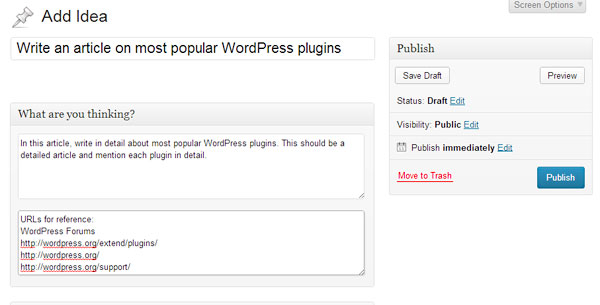
When you are finished, hit the Publish button. Don’t worry, your post idea is not visible in front-end and is only visible in WordPress admin area. When you click on “Preview changes” button, you will get a 404 page but then a preview is also not required.
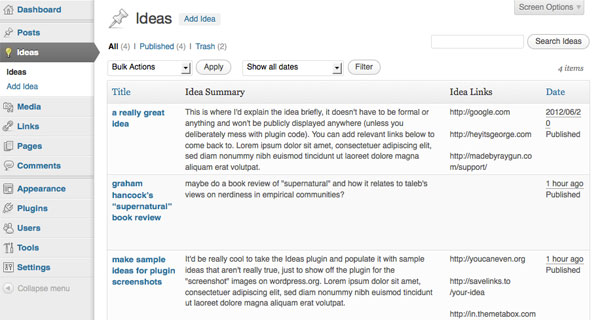
Click on “Ideas” to view a list of all of your ideas.
Conclusion
Overall it can be said that this is very simple, but useful plugin. Of course you can add post ideas by a simple draft but then those drafts are mixed with the rest of the posts. This plugin creates a separate section for post ideas, and that too, in your WordPress admin area so that you don’t have to open any other app/program to refer to your ideas. If you don’t mind installing a separate plugin for keeping a track of your future post ideas, then this one’s for you.