

If you are thinking to sell digital products like photos, videos, audios, PDF or any other type of file, then one question that will come to your mind is how to sell such digital products, securely. No doubt you will want to protect your hard work and offer a secure way to your visitors/customers to purchase your digital files. That’s where a new WordPress plugin Sell Media comes to the scene.

Sell Media is an easy to use way for videographers, photographers, musicians and artists to publish and sell their content on WordPress site. Be it any digital product, this plugin has it covered. This plugin can help your website to start earning money, instead of just showing off your photos or other media on your website.
This plugin can help you build a stock photo site, stock audio or any other media site where you can sell your digital product. Some features of this plugin are:
- Categorize your media into collections.
- Set different price for different licenses.
- Protects your high resolution images by putting them in a folder that isn’t accessible directly from web.
- Many different extensions available, for example: watermark, magnifier, mailchimp, and many more are coming.
- Very easy to configure options.
- Display product anywhere with a shortcode.
- Shortcodes can be used to display checkout cart, thanks, buy button and search form.
- Bulk upload images for sales.
- Documentation available to get started.
- PayPal payment gateway integrated.
- And more.
To install this plugin, head over to the GraphPaperPress website, click on the “Download Plugin Now” button and enter your name and email address. You will get the download link in the email. Just in case you didn’t get any email then check the spam folder.
Download the plugin, install and activate it. Once activated, you will see a new menu named as “Sell Media” and all the other options within that main menu. Here’s an explanation of each of the menu item:
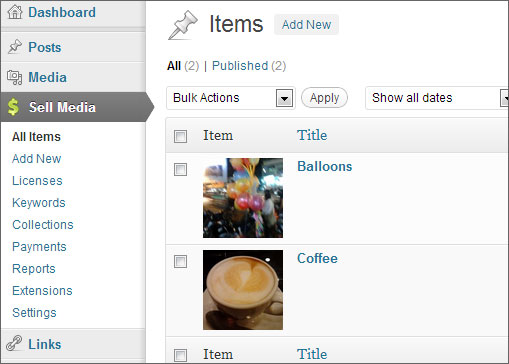
All items: Displays all of your products. Think of this as all posts option, but for items (or products).
Add New: Add new items (products) from here.
Licenses: Add licenses for your products.
Keywords: Add Keywords for your products. Think of this as tags.
Collections: Add new collection from here. Think of this as category.
Payments: This page will display all the transactions and payment related details.
Reports: See sales report from this page. Reports are divided in three sections: Earnings per day, per month and per year.
Extensions: You can purchase additional extensions from here.
Settings: Change/configure settings from here. Also you will need to configure PayPal payment gateway related details from here. You have the flexibility of selecting any of the desired page as a checkout page and thanks page. You can configure the “Emails” that is sent to your customer who has purchased a product. Change the name, email address, subject and email body directly from the interface provided.
Closing Words
It can be said that Sell Media plugin from GraphPaperPress is a superb way to sell digital products without much fuss. It doesn’t comes with any unnecessary options and PayPal payment gateway is already integrated in the plugin. The flexibility of using a shortcode to insert a product in any page or post is really interesting. The best part is that this is a free plugin and it should do wonders for those who are thinking to sell digital items on their WordPress based site. It’s worth trying out.