

Recently, many webhosts have confirmed about the brute force attacks which are targeted towards WordPress and Joomla sites. This problem has increased over time, and webhosts like Hostgator and LiquidWeb have confirmed about these mass brute force attacks. As per Hostgator, this attack is well organized and very distributed, and over 90,000 IP addresses are involved.
Here’s what Hostgator has to say regarding these attacks in a blog post:
As I type these words, there is an on-going and highly-distributed, global attack on WordPress installations across virtually every web host in existence. This attack is well organized and again very, very distributed; we have seen over 90,000 IP addresses involved in this attack.
In short, a brute force attack involves someone constantly trying to login to your website using different password combinations. That’s why, at BeginWP, we always tell users to use a strong password which is a combination of numbers, alphabets as well as special characters. But now that this attack is going on worldwide, let’s learn what you can do to tackle WordPress brute force attacks.
1. Use a strong password
Use a strong password and avoid common passwords such as abcd, 1111, 12345, xyz, your name, etc. The brute force attack targets all the common passwords first, and that’s why you should use a strong password that is a combination of uppercase and lowercase letters, numbers and special characters like #@*^. For example; a strong password would be something like ukdLM#7190^. Also, never use the same password at two different places.
2. Don’t use the admin username
Many times, the most common usernames are targeted such as admin, webmaster, administrator, test, etc. These all are very common usernames and that’s why, it makes sense to avoid using them. Don’t worry, from the backend, you can select a different name that’s publicly visible. This means that your username can be “amazingme” and you can choose a different name to be displayed on the front-end.
3. Backup often
Take regular backup of your complete WordPress site. Some people don’t give importance to backup, and unfortunately, they realize the value of backup only after a disaster strikes. Also don’t rely much when your host says that they regularly perform backup, because if they don’t, then it will create more problems.
You can use WP-DBManager plugin to backup your WordPress database which is one of the most important part of any installation, because themes and plugins can be replaced, but database once gone means gone, it cannot be replaced. BackupBuddy is another plugin that can backup your complete WordPress site with themes, plugins and database, and can also restore the site if required.
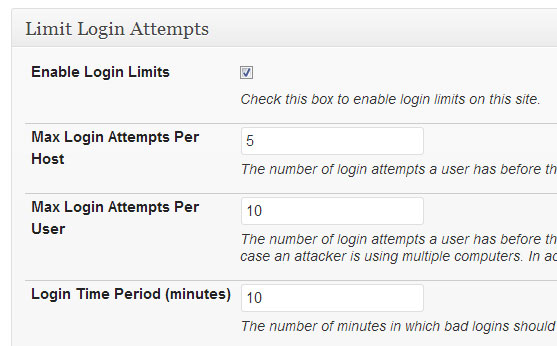
4. Limit login attempts
It is highly recommended that you limit login attempts. This can be done by using a security plugin like Better WP Security, or by using Limit Login Attempts plugin which can be downloaded from here. To strengthen the security, you can also password protect your wp-admin directory by using cPanel.
5. Update core WordPress, themes and plugins
Many times, hackers take advantage of old exploit holes that have been identified, and therefore always keep your core WordPress installation, all your themes and plugins up-to-date. Don’t take risk by not updating to the latest version. Spend some time and update everything – core, plugins and themes. Check out this tutorial on how to update WordPress to latest version.
6. Use two-factor authentication
If you are on WordPress.com, then you can enable this two-factor authentication from “Security” tab of your account settings. Configure everything correctly in the setup wizard and you’ll be up and running with the two step authentication in no time.
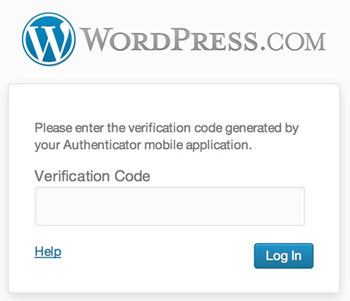
But if you are on self-hosted WordPress installation, then use Google Authenticator plugin. This plugin gives you two-factor authentication using the Google Authenticator app for Android, iPhone and Blackberry.
So that’s it. For now, there’s no fool proof method to completely stop these brute force attacks, but we as a WordPress user can at least do our bit. It’s better to spend some time and take preventive steps to ensure that our WordPress powered site keeps on running in a healthy shape. Try out these tips and stay safe!