

Previously, we’ve looked at how to prevent your WordPress blog from spam comments. But what if your spam queue already has thousands of comments and you want to delete all of them in one go? Of course, you can always head over to ‘Comments’ section and click on ‘Spam’ to open your spam queue and from there, click on ‘Empty spam’ to delete all the comments in bulk, instead of deleting every comment manually. But the problem with this method is that sometimes because of your webhost’s limitation, you won’t be able to process delete request of all those thousands of comments. That’s where WPCommentCleaner plugin steps in. Let’s take a closer look at it.
WPCommentCleaner plugin not only deletes all spam comments, but it also lets you mass delete un-approved and approved comments in one click. However, you should take caution when deleting the un-approved and approved comments because comments once deleted cannot be recovered back until and unless you have took a backup of your WordPress database.
Install and Activate the WPCommentCleaner plugin. Once activated, you’ll be able to see a new menu named as “CommentCleaner” in your Dashboard. Click on it and you’ll be able to see a simple screen from where you can bulk delete all un-approved, spam and approved comments.

For some reason, the plugin was not able to count the total number of comments, but when I deleted spam comments by clicking on “Delete” button, it worked.
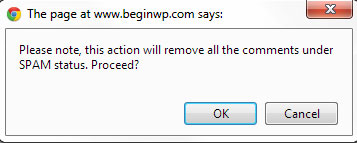
Once you click on delete button, you’ll get a confirmation message that you are going to delete all the comments. Just click on OK to proceed and delete all comments. You will now get a message that says “Deleted successfully.”
Now that you’ve used this plugin, you can safely deactivate and remove this plugin from your site as its purpose has been fulfilled.
Using phpMyAdmin to Bulk Delete Comments
While the above plugin works great, not everyone wants to install a plugin for each and every task. Simply follow the below steps to delete all comments using phpMyAdmin.
- Open phpMyAdmin from cPanel.
- Choose your WordPress database from the left.
- Click on “wp_comments” to open contents of this table.
- Now, you can selectively delete each comment by clicking on the red X icon. Alternatively, if you want to delete all WordPress comments, then simply click on “Empty” button as pointed out in below screenshot.

Welcome to a cleaner and spam free WordPress site.