

Jetpack is a very popular plugin that brings the awesome cloud power of WordPress.com to self-hosted WordPress users. Developed by Automattic, this plugin can add multiple features to WordPress blog. But one thing that many people don’t like is that this plugin forces users to connect with WordPress.com. This is a pre-requisite before using Jetpack plugin. If you don’t connect your blog, then the plugin will display an annoying banner throughout the dashboard and it will force you to connect to WordPress.com. This is really annoying, but what if you want to use Jetpack without authenticating or linking to WordPress.com ?
Fortunately this is possible with the help of Slim Jetpack plugin that allows users to get Jetpack features without a WordPress.com account. Let’s get into more details.
To get started, first thing that you’ll need to do is to install Slim Jetpack plugin. This plugin is an independent fork of the original Jetpack plugin, and it is not maintained by Automattic. This also means that the developer will need to update the plugin whenever a new version of Jetpack comes out.
After activating the plugin, you’ll need to go to Settings > Slim Jetpack. From here, you’ll be able to see all the modules that this plugin comes with. Just click on the “Activate” button to activate the module that you’re going to use. There’s no need to activate all the modules, just activate those that you are going to use.
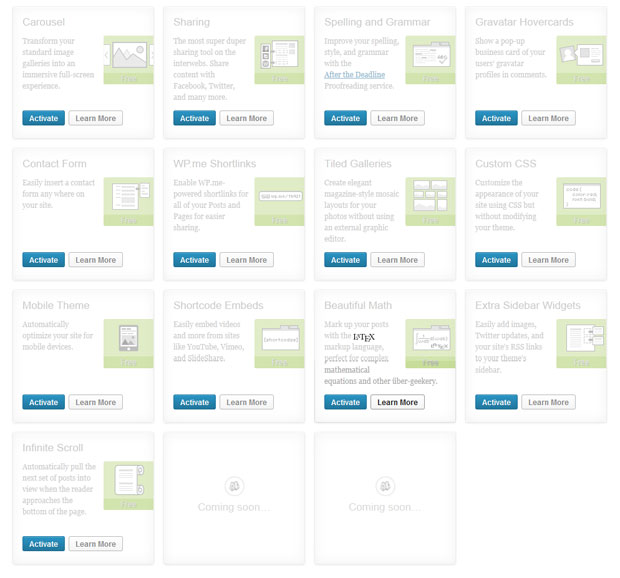
Slim Jetpack comes with these modules:
- Carousel
- Sharing
- Spelling and Grammar
- Gravatar Hovercards
- Contact Form
- WP.me Shortlinks
- Tiled Galleries
- Custom CSS
- Mobile Theme
- Shortcode Embeds
- Beautiful Math
- Extra Sidebar Widgets
- Infinite Scroll
Note that this plugin does not come with WordPress.com stats, subscription, push notification services and other modules that rely on the WordPress.com API. If you want to use these modules then you’ll need to use the original Jetpack plugin.
Slim Jetpack is a superb alternative to Jetpack. It is worth trying out if you don’t want to connect your blog/site to WordPress.com. Are you thinking to try it out on your site? Let me know in the comments section.